
Who is it for?
Built for any organisation managing a property portfolio, including public institutions, municipalities and subsidiaries, large enterprises, property companies, shopping-centre operators and facility-management organisations.
PROPERTY MANAGEMENT SYSTEM

Centrally manages leasing, contracts, accruals, invoicing, mapping and reporting across property portfolios.
USE CASE
Built for any organisation managing a property portfolio, including public institutions, municipalities and subsidiaries, large enterprises, property companies, shopping-centre operators and facility-management organisations.
Keeping portfolio, contract and financial data in separate files makes current information harder to access and cross-check. GalaksiProperty connects these records within one management structure.
Property location, leasing status, contract, accrual and invoicing data can be monitored in one view, creating a consistent data foundation for reporting.
Land, buildings, offices, shops, commercial areas, staff housing, warehouses, leased assets and organisation-owned properties are managed in connection with location, tenant, contract and financial processes. Multiple companies, subsidiaries, cities and portfolios can be tracked in one system.
Data can be received from or supplied to enterprise systems via APIs and web services. Excel files and legacy-system records can be migrated through cleansing, matching and validation steps. Permissions can be defined by company, unit, module and action.
MODULES
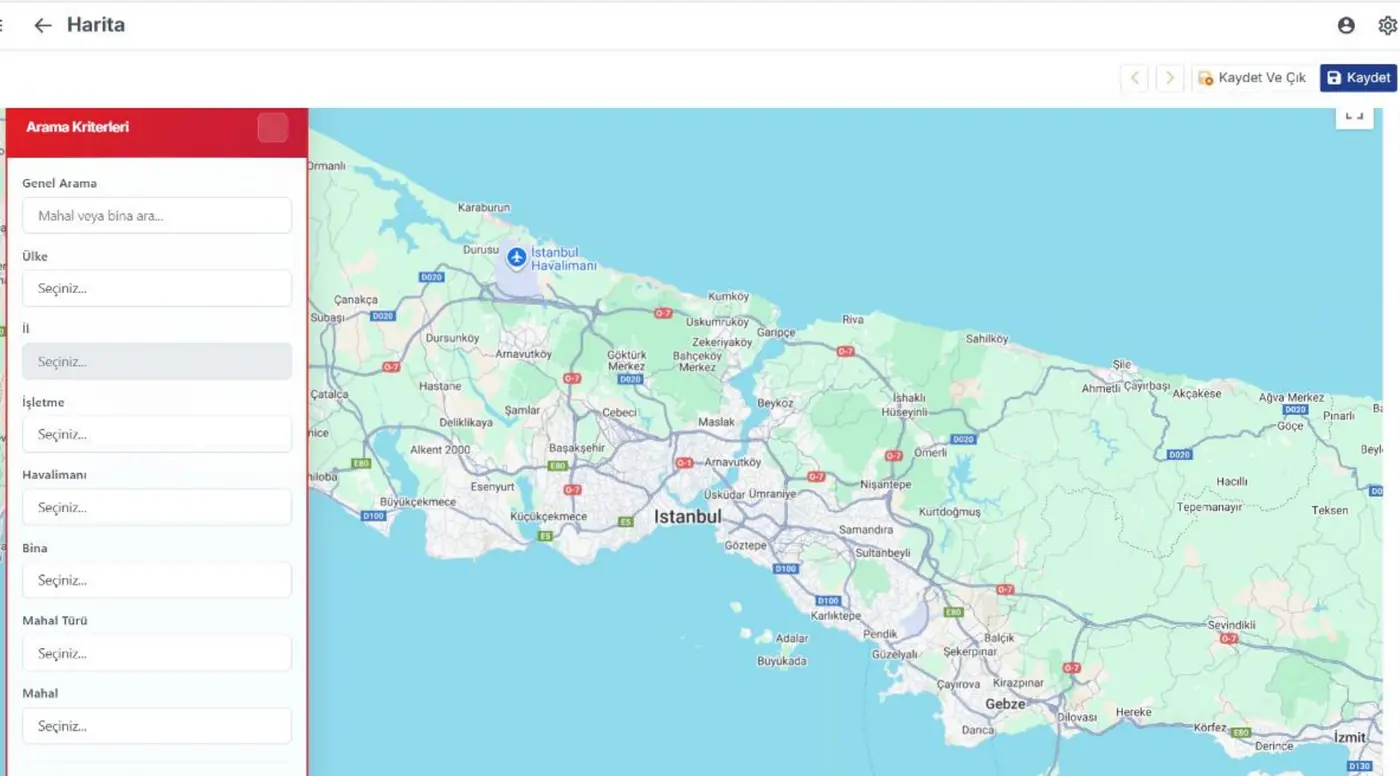
Manage property location, building drawings, documents, contracts and related information in one view.
Bring the registration and tracking of leasing processes into one central structure.
Connect contract information with the relevant portfolio and tenant records.
Automatically create accruals based on the leasing period.
Manage financial processes together with property and contract data.
Provide reports on occupancy, rental income, contract status, accruals and payments, portfolio value and budget.
FIELD REFERENCE
All GalaksiProperty modules are used in Turkish Airlines’ property-management operations.
FREQUENTLY ASKED QUESTIONS
Built for any organisation managing a property portfolio, including public institutions, municipalities and subsidiaries, large enterprises, property companies, shopping-centre operators and facility-management organisations.
Land, buildings, offices, shops and commercial areas, staff housing, warehouses, leased properties and organisation-owned properties can be managed. Multiple companies, subsidiaries, cities and portfolios can be tracked in one system.
Alongside property location and building drawings, documents, contracts and other registered information can be viewed in context through the map.
Start and end dates, extensions, rent increases, guarantees and deposits, reminders and contract documents are tracked. Accruals and invoices can be generated automatically according to the leasing period.
Notifications can be created for upcoming contract expiries, payments and defined dates. Occupancy, rental income, contract status, accrual and payment, portfolio value and budget reports can be exported to Excel or PDF.
Yes. Excel files and legacy-system records can be migrated to GalaksiProperty after cleansing, matching and validation steps.
Yes. Data can be received from or provided to different enterprise systems through APIs and web services. The integration scope is defined during the needs analysis.
Following the needs analysis, the solution can be deployed in the cloud or on the organisation’s infrastructure and, if required, as a white-label solution. Training is provided according to the user base; support and automatic version updates are available under the maintenance agreement.
Once your request reaches the sales team, they contact you to assess your portfolio structure and requirements. The appropriate demo scope, deployment model and any customer-specific development needs are then defined.
GALAKSIPROPERTY